Asset registry · cloud or self-hosted · desktop + Unreal Engine 5

Everything your studio
ever bought or built.
One search away.

Prophouse puts it all in one catalog the whole studio can reach. Every entry is versioned and owned by someone you can ping. Search by what things look like, then pull them into Unreal with everything they depend on.

Real footage. Assets shown are third-party marketplace props from a demo library, for illustration only — Prophouse catalogs assets you own; none are included or resold.

workspace foundry-north · semantic index live · answers in 38 ms · zero tags maintained

01The tour82 s · sound on

From loose files to a shipped scene.

Eighty seconds, one asset: scanned at ingest, written up as a record, found by meaning, reviewed, and pulled into the editor with its dependencies.

82 s · sound on. Assets shown are third-party marketplace props from a demo library, for illustration only.
03Search by imageconcept_donut.jpg · 4 matches

Concept art in, props out.

Drop a reference image into search and the library answers with assets that look like it, ranked by how close they come. The filenames never matter.

It reads illustrations as well as photos. A concept painting finds the finished meshes it inspired; a site photo finds the materials to rebuild it. From any match, "more like this" opens the whole family.

Built for archives too →

search by image · concept_donut.jpg → 4 visual matches
04Your originalsyour own work, indexed

The expensive assets are the ones you made.

A pack can be bought twice. Three weeks of an artist's work can't. That work is sitting in an old depot, on one machine, or in the head of someone who left, and every new project starts without it.

Publish your originals to the same catalog as your packs. New project, day one: ten years of your own work in the search results.

05Desktop app19 formats · offline

The library lives on your machine too.

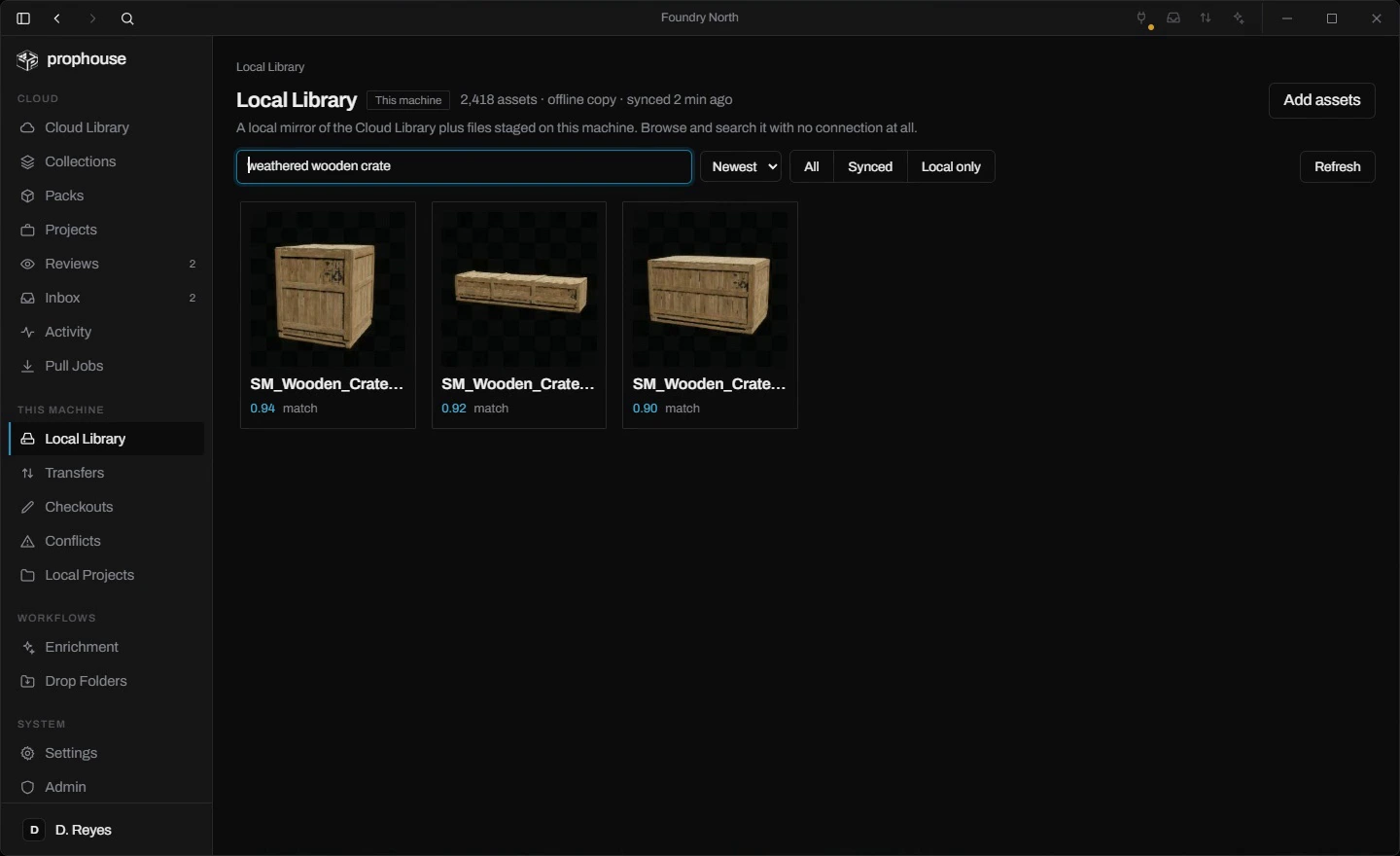
The desktop app keeps a working copy of the library on your machine. Browse it offline, queue a check-in from a plane, and it syncs when you land.

Drop a folder of loose files on it and they catalog themselves. Thumbnails, previews, and metadata for 19 formats, generated locally, searchable by sight the moment they render.

local library · offline · on-device semantic index
Drop folders

Watch a folder, get a catalog.

Anything that lands in a watched folder is hashed, previewed, and staged for the library. Meshes get turntables, textures get renders, audio gets waveforms.

Durable transfers

Close the app mid-upload. It finishes anyway.

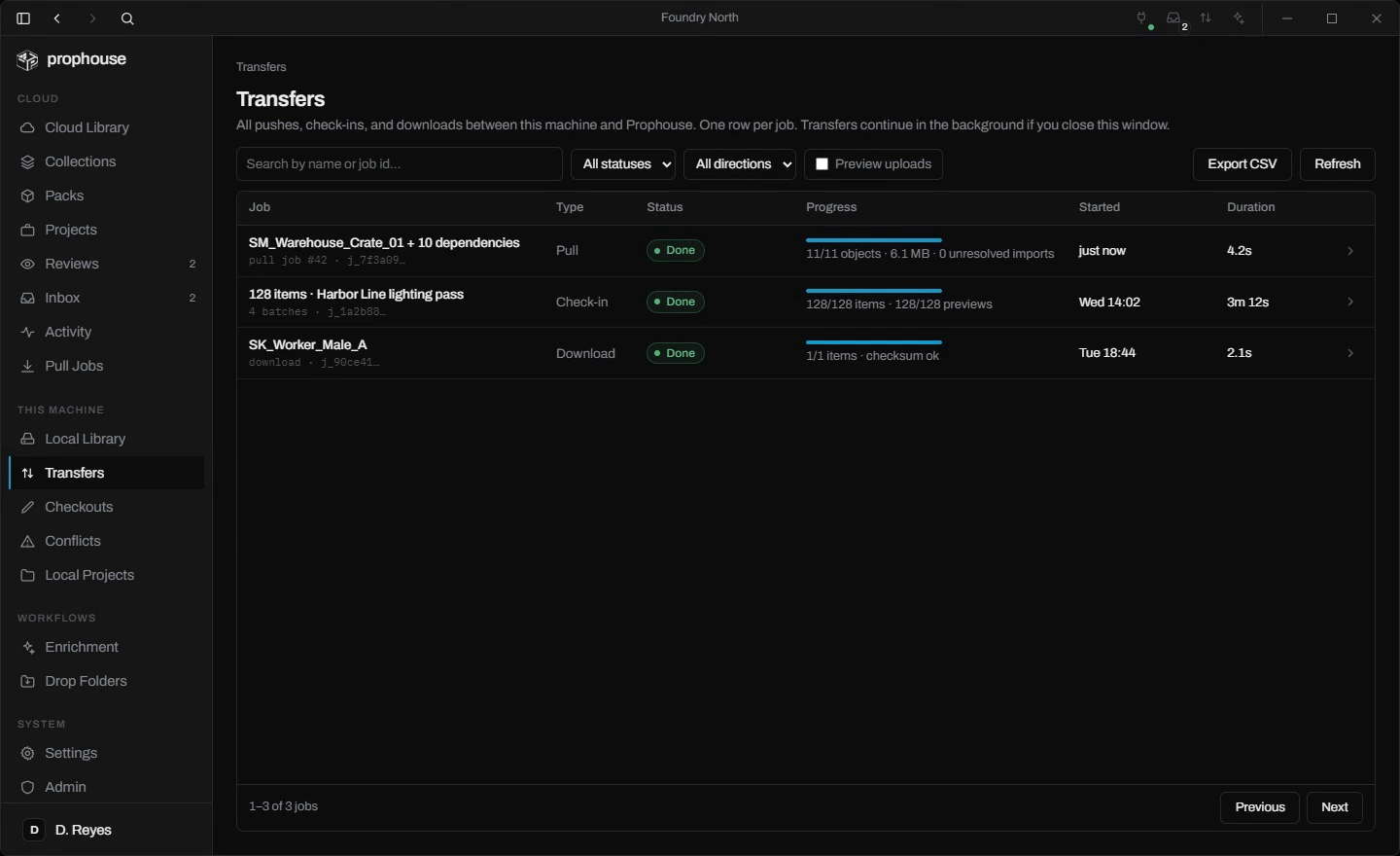
Uploads keep running after the window closes. A cancelled download resumes from its last byte, and every file is checksummed both directions.

On-device search

Semantic search for local files.

An optional on-device index answers meaning and image searches against files that never left your machine. Nothing is uploaded.

06PreviewsSM_Warehouse_Crate_01 · 98k tris · live
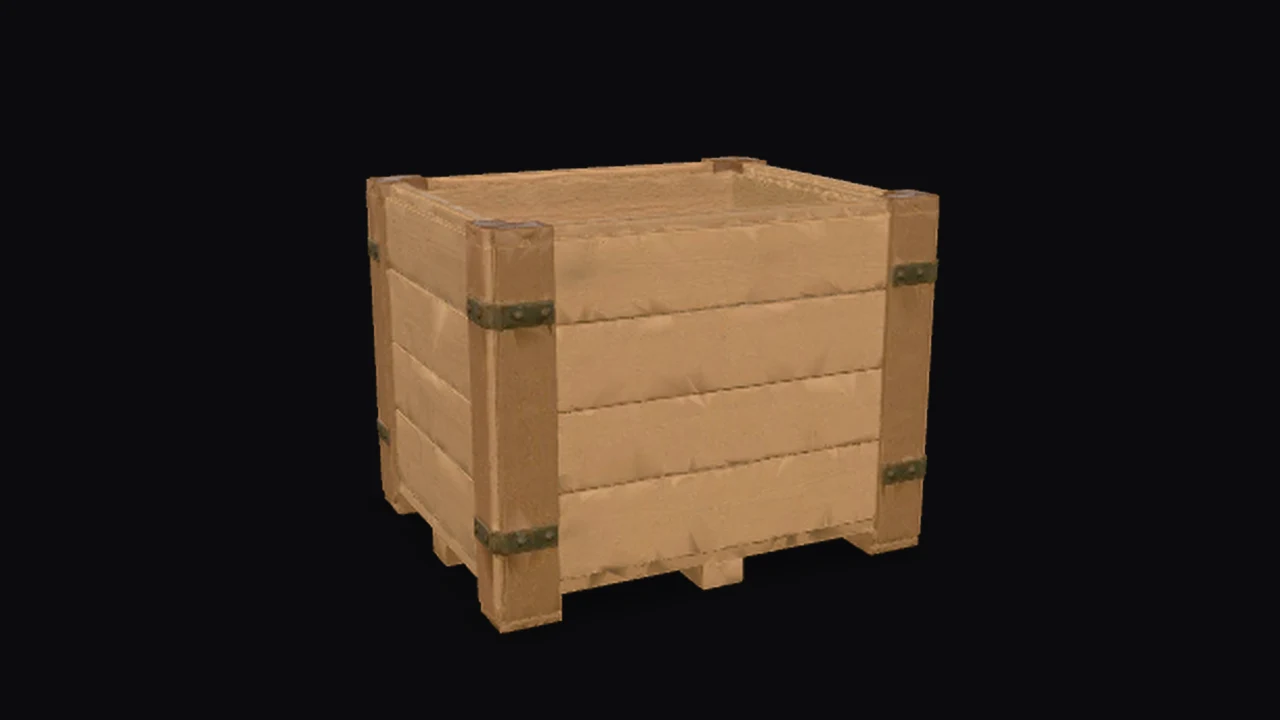
A weathered wooden warehouse crate rendered with studio lighting.

SM_Warehouse_Crate_01 · the live 3D preview needs JavaScript and WebGL. The rest of the page works without them.

SM_Warehouse_Crate_01 · GLB · 98k tris · drag to orbit

Spin it before you pull it.

This one is live. Drag it. Every mesh gets a textured 3D preview you can orbit right in the browser, with its real materials baked in and studio lighting. A multi-million-triangle Nanite hero previews from a light proxy, so judging an asset never costs a download.

It holds up at six figures. The grid virtualizes, so a 100,000-item library scrolls like a folder of ten, and thumbnails cache on your machine between sessions.

07Reviews & approvals20 reviewers · verdict pinned to v5
review round · verdict pinned to v5

Red-line the asset itself.

Send an asset to up to twenty reviewers. Each one approves or requests changes, the fix routes to a named person, and the verdict pins the exact version it was made on.

Draw on a render with pen, arrows, boxes, and text. Capture any window on your screen and mark that up too. On a 3D model, drop a pin on the exact spot; it saves the reviewer's camera angle so you see what they saw.

@-mention anyone, reply in threads, watch the assets you care about. It all lands in one inbox, with a desktop notification when the app is in the background, and "awaiting approval" works as a search filter.

capture-first markup · drawn on the render, attached to the thread
08Versioning & custodyv5 · lock held 3h 12m

Check it out. Check it in.

Lock an asset and the whole team sees who holds it, in the app and in the editor. Check it in and a new version lands on its history. Every prior version stays a click away, and restore is one click more.

Open any entry and read its paper trail: who touched it, which projects ship it, what it depends on, and every entry that would feel a change. When an edit collides with someone else's, you get a plain choice between keeping yours and taking theirs.

Custodylineage · SM_Warehouse_Crate_01
> checkout SM_Warehouse_Crate_01
locked · visible to the whole catalog
> checkin "hinge rework"
v5 on lineage · v4, v3, v2 kept
used by 14 entries · 2 shipping projects
lock released · held 3h 12m
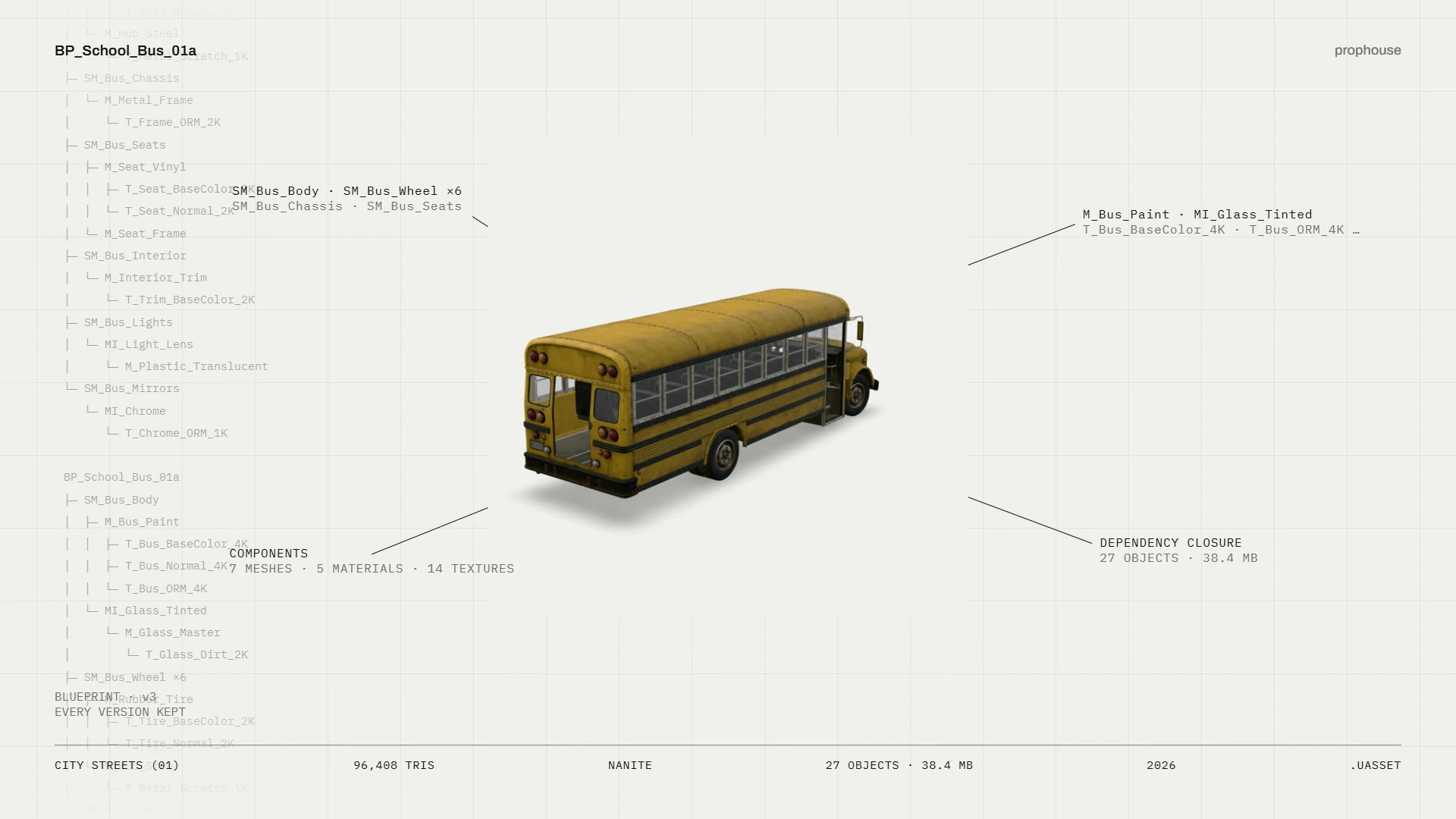
An asset record drawn as a spec sheet: a school bus blueprint with leader lines to its component meshes, materials, and a dependency closure of 27 objects at 38.4 MB.
every asset gets a record · components, textures, and the full dependency closure
09Unreal pluginUE 5.5 · 11 objects · 2.4 s

The library, inside the editor.

Install the plugin and the catalog shows up as a panel in UE5. One click imports an asset with everything it depends on, wires up the references, and proves the result: zero unresolved imports, or the whole pull rolls itself back.

It syncs both ways. Push from the Content Browser and only bytes the server has never seen actually travel. The desktop app takes the upload from there, so you can close the editor and go home.

Built for game studios →

UE 5.5 · drag in, dependencies resolved · publish back
10Packs214 assets · about four minutes
pull · 11 objects · 6.1 MB · checksummed both directions

You bought the building.
You needed the mug.

Point Prophouse at a Fab pack and it unpacks it, walks every asset inside, maps what depends on what, renders previews, and embeds every one of them for search. Hand it a whole pack and get back a catalog you can search in plain English, in about four minutes.

After that, nobody imports a whole pack to place one prop. Search for the mug, import it, and Prophouse brings the mug's materials and textures with it. The other 213 assets stay on the shelf until something needs them.

11MCPtenant-scoped · every plan

Agents shop here too.

The catalog speaks MCP. An agent blocking out a level asks for a weathered streetlight under 5k tris and gets the right mesh with everything it depends on, even when the file is named SM_Prop_04. Agents reason in concepts; the index answers in assets.

It works for people too. Point your assistant at the library and it fills a set, hunts variants, or preps imports while you stay in the editor. Tenant-scoped, authenticated, and on every plan.

Agent sessionMCP · tenant-scoped
> search "weathered streetlight" · max 5k tris
2 matches · 38ms
SM_Prop_09Dockside Props4.2k
SM_Lamp_DCity Streets Vol.13.6k
> pull SM_Prop_09
resolved 7 objects · 3.8 MB · refs rewired
12Screenshots1440×880 · as it ships

It looks like this.

The desktop app, as it ships. Dark theme, one window, the whole library.

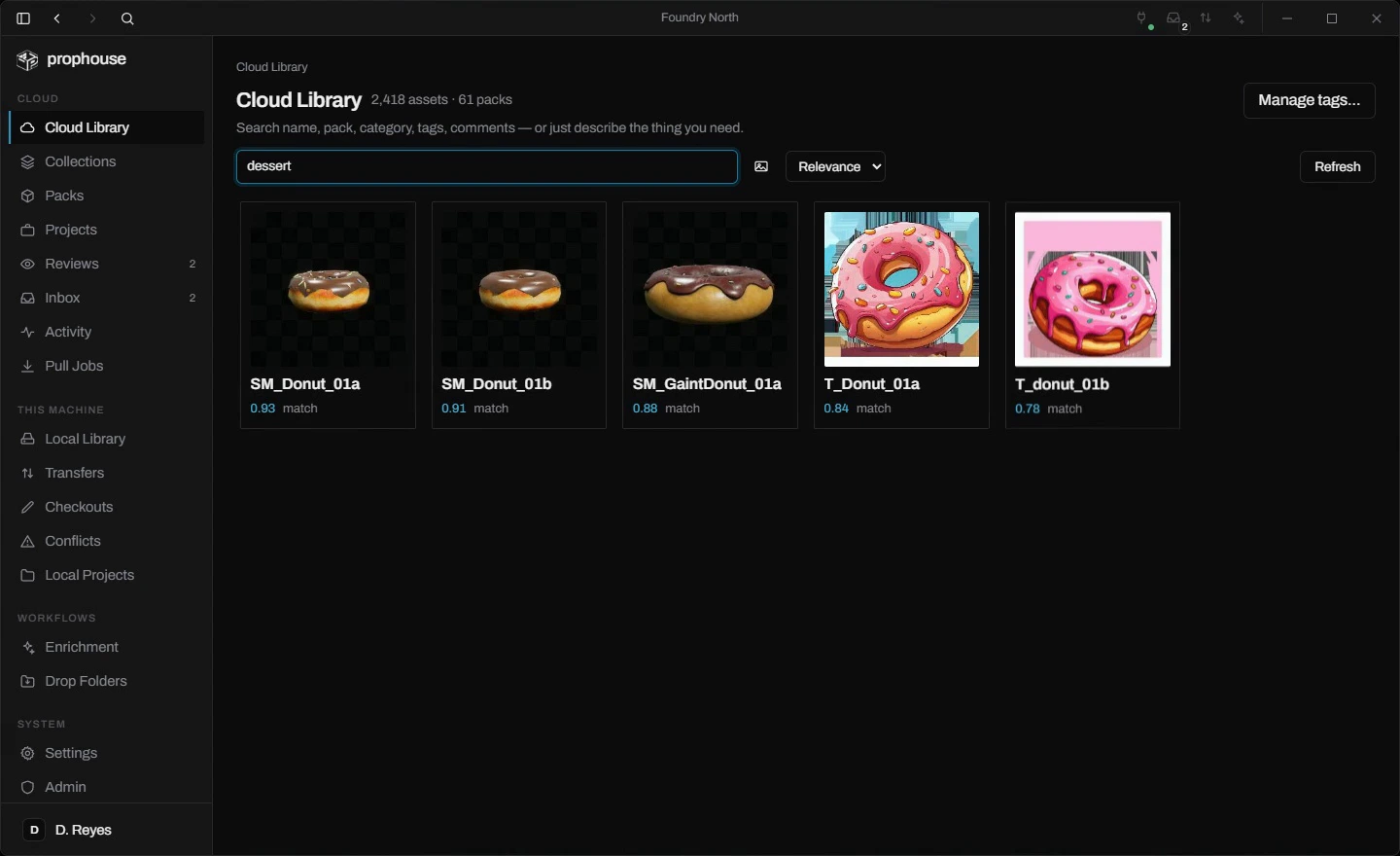
Cloud Library search results for 'dessert': donut meshes and textures with match scores.
cloud library · search by meaning
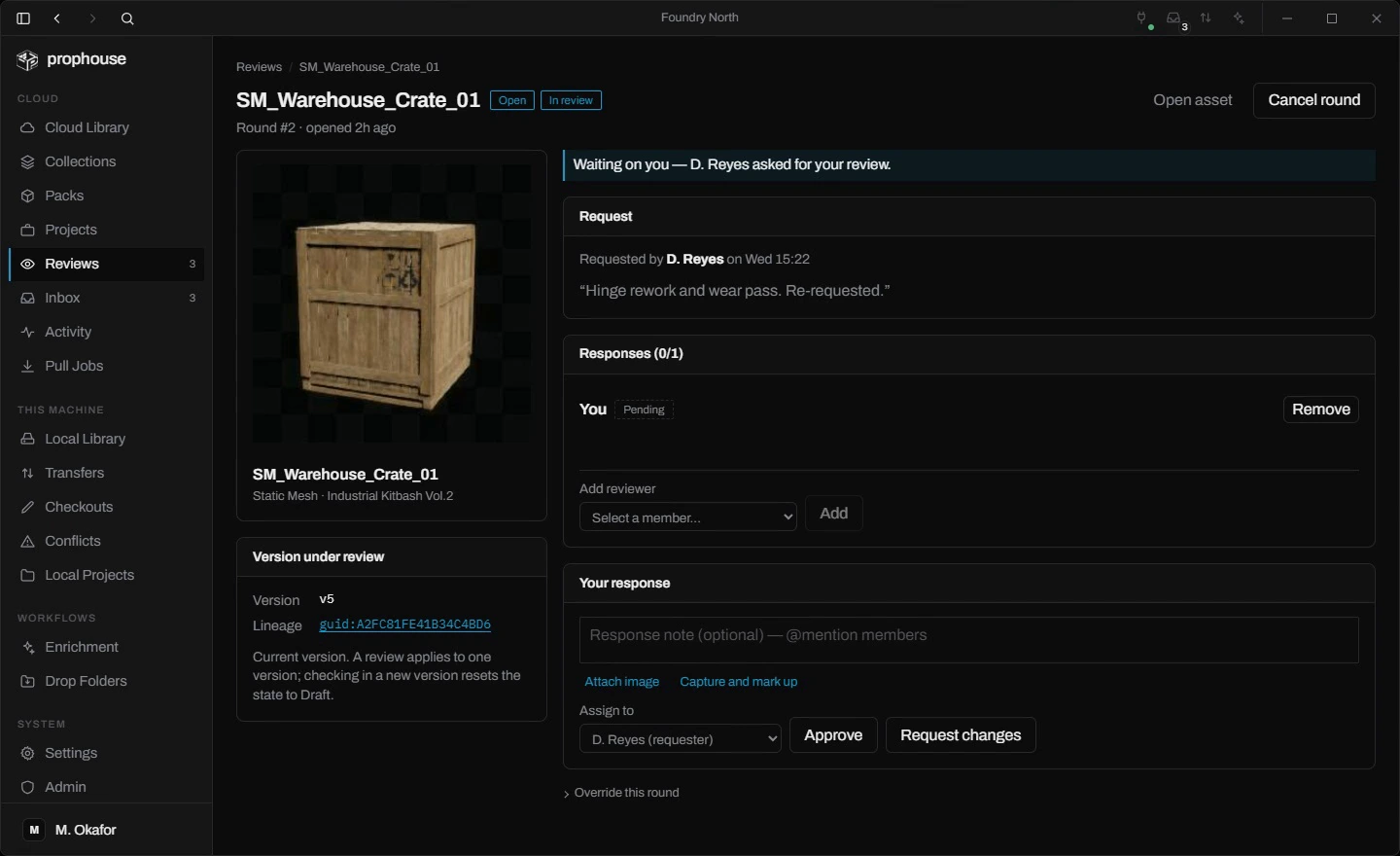
The review workspace: request note, reviewer response area with Approve and Request changes, and the version under review.
review workspace · the verdict pins the version
The Transfers page: pull and check-in jobs with progress bars, statuses, and durations.
transfers · durable, resumable, checksummed
The Local Library, offline: search results for 'weathered wooden crate' from the on-device index.
local library · offline, on-device index
13Capabilities12 entries

The rest of the kit.

3D pin annotations

Notes pinned to the geometry, camera angle saved with them.

Screen capture & markup

Grab a window, draw on it, attach it to the thread.

Asset locking

Exclusive holds everyone can see, in the app and the editor.

Versions & restore

Immutable history on every asset. Roll back in a click.

Approval flows

Review rounds, routed fixes, verdicts pinned to the version.

Mentions & inbox

@ someone and it reaches their inbox and their desktop.

Duplicate detection

The same mesh flagged across packs, projects, and drives.

Dependency graph

What it needs and what needs it, sized, down to the texture.

Auto-categorization

Props with props, vehicles with vehicles, on ingest.

Search by image

Concept art in, matching props out.

Collections & tags

Curate sets, pull a whole collection as one job.

Webhooks

Ten event types pushed to your own systems, signed.

14Who it's forgames · arch-viz

Built for game studios and architecture teams.

Profile Aeditor speed

Game studios

The library at editor speed, from first block-out to ship.

  • In-editor browser with one-click, dependency-complete import
  • Push from the Content Browser; only new bytes transfer
  • A Fab pack becomes a searchable catalog in about four minutes
  • Locks, versions, and reviews built for binary work

For game studios →

Profile Bthe archive, findable

Architecture & visualization

Every model, material, and texture you've ever bought, findable again.

  • Search by description, or match a reference photo
  • Drop folders catalog project drives by themselves
  • Duplicates surface before they triple your storage
  • Client sign-off drawn on the exact revision

For architecture →

15Deploymenthosted · self-hosted · air-gapped

Our cloud, or your metal.

Most teams take the hosted version and never think about servers again. Major studios run the whole thing inside their own walls.

Deployment ledger 6 fields
Deployment
Hosted, or self-hosted behind your VPN. Enterprise runs air-gapped.
Training
Never on your assets. Search reads your previews; nothing you upload teaches it.
Credentials
Editor and desktop tokens live in the OS credential store. Encrypted at rest by the OS.
Updates
Desktop updates are cryptographically signed. Download now, install on restart.
Webhooks
Ten event types pushed to your own systems. Signed, with delivery receipts.
Exit
Full export the day you want it. $0 to pull.

How studios run it →

16Pricingone meter

We meter one thing.

Seats, plus whatever you store above your allowance. Searching is unlimited on every plan, and moving assets in or out costs nothing. Start free with 50 GB of your actual library.

searches $0 · transfer in $0 · transfer out $0 · $0.04/GB past your allowance

See pricing →

17Early accessprivate testing

Start your next project
with everything you've ever made.

Prophouse is in private testing with a few studios. Leave an email and we'll send you a seat when it's ready for production work. Larger studios can ask about a self-hosted pilot now.